SUBSCRIBE.
Sign up for my newsletter. Filled with blogs, discounts, events and other news. 1 – 2 per month, max.


Such a nice morning shooting macro.
7,000 shots sitting on my SD card. And that’s not even that much. A single stack is often made up of 50–100 shots. So that’s potentially 100 photos, 100 final results… from just a few hours of shooting.
I think this is something quite a few macro (and micro) photographers come across: editing fatigue. You get so overwhelmed by the sheer number of shots you still have to edit, it kind of takes the fun out of it. And even if you actually quite like the result of your stacks… out of fear for the amount of work, they sit in archives collecting digital dust.

I came across it in a Reddit post where the creator of the app himself was explaining a bit about his APP. Now, I don’t need another editing program, or even another stacking program – I’m very content with Affinity for that. But I like to keep on top of techniques that may help me save time or help others in the macro community.
I feel that many people have that sense of overwhelm. And beautiful photos don’t even get a chance because they’re buried in a massive pile of unchecked stacks.
What caught my eye was the StackCheck feature. It automatically alerts you to single shots that might be messing up your final result.
Because sometimes it’s such a pity that your stack is actually good, but a few frames are not aligned well, or there are “doubles” that are just a 0.1 mm angle change. That’s huge on a bee’s “moustache”. So identifying those culprits and offering to restack the sequence without these disrupting shots them in a single button click… oooff… that is super helpful. That’s why I decided to give it a go.
A happy accident (and a nice macro connection)
The first stack I put into MacroStudio to process actually messed things up. The stack didn’t look great, did I just throw away my money?
But I’m so glad the result wasn’t good, because it put me in direct contact with the creator, Ryan. When I messaged him, he directly knew who I was – and I actually happened to be one of the people who inspired him to get into macro in the first place. Sorry not sorry.
With a bit of chatting back and forth with the creator came: ‘Did you already try the automatic stacking?’
I thought he meant just one stack, and yes I tried it. But to my surprise that was not what he meant. Turns out you can actually put in 7,000 (or however many) shots in one folder and let Macro Studio do the sorting and stacking. The app creates separate folders per stack, stacks them automatically, and puts them in separate folders.
It even has a built-in editor that does necessary macro stuff: adjustments, masks, retouch, crop, watermarks, and export. I don’t need this, because I’ve got Affinity for that, but, it’s handy to have in one place.
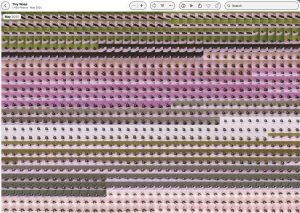
I let Macro Studio process 1437 shots for me. It’s photos I took in 2025, put in an album in the Photos app (Mac) and… forgot about it. This happens more often than I’d like to admit. And one of the reasons is that it just simply takes so much time to sort and stack them all. My ‘FOR LATER’ file is huge.
So back to those 1437 shots! Put them in a single folder, press ‘AUTOSTACK’ and let the app do its thing.
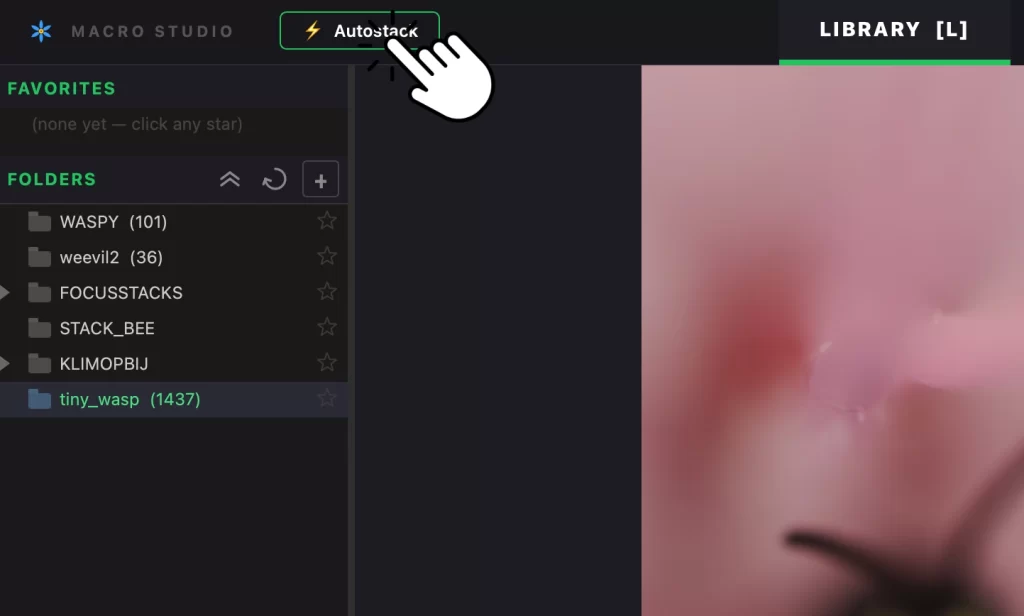
There are 24 stacks in total, a progress bar tells me. This will take some time, so I take the dog for a walk. After approximately 25 min the 24 completed stacks are waiting for me in sorted folders and a separate folder for the 24 final results.

This gives me a quick overview of which stacks are keepers and which are throwaways. I decide to keep only 1, a stack of 61 shots I really liked. The other shots I delete. That means 1376 shots that would otherwise clog up my already full archives.
I should calculate exactly how much time that actually saves me, but it’s massive. I would normally go through all the shots by hand, marking where the bracketing series starts/ends. Then stacking all of them separately, based on if I THINK the stack looks good. Yup… it eats a lot of my time.

Now this method with Macro Studio helps me to:
• Focus on the “winners”
• Keep my archives clean
• Avoid that sense of overwhelm that kills the joy of (focus bracketing) macro
And the thing is: I know it will help many others as well. The creator Ryan is updating his app multiple times per week, tweaking it and making it better every step.
For me, it’s already worth it for the autostacking and sorting files alone.
If you want to try it, you can use the discount code:
If this sounds like something you might like, if you recognise that feeling of being overwhelmed by stacks, or if you’ve got folders full of ‘maybe later’ focus brackets… then Macro Studio might be worth a look.
And if you try it: I’d love to hear about it.